
Brigg, your roofing AI
Ask Brigg. He already knows your company.
Brigg is the AI built into CoContractor. Ask about your storms, your properties, and your numbers, and he answers from your own account. Ask him to book an inspection or set up an EagleView order, and he hands you a card to check. Nothing happens until you tap.
Brigg included with your 14-day free trial.
Ask him anything
Type it or say it. He answers with your own data.
He's the tab on the right edge of every screen in the app. Talk with the mic, type, or show him a photo of the property, and he knows which property it's from.
- What's on my calendar tomorrow?
- Which of my leads are in Follow-up?
- How many squares is 1418 Oak Ridge?
- Where does Rachel Dunn's estimate stand?
- Any storms within 50 miles of Norman this month?
- How do I invite my team?
BriggYour roofing AIAsk Brigg things like “Which storm hit the most homes in my territory last week?”, “Tell the team we're working Canadian County tomorrow.”, “Book an inspection at 1418 Oak Ridge for Thursday at 3.”, “Order an EagleView for 1418 Oak Ridge.”, “How'd I do this week?”, or “Make me a report on last month.”
He hands you the button
Brigg sets it up. You tap to make it happen.
Anything that books, orders, or sends comes back as a card with the details filled in. Check it, change your mind, or tap the button.
Book an inspection at 1418 Oak Ridge for Thursday at 3.
You're free Thursday at 3.
1418 Oak Ridge · Chris Walker
CancelBookBookedOrder an EagleView for 1418 Oak Ridge.
Premium Residential, ready to order.
- Property
- 1418 Oak Ridge
- Report
- Premium Residential
- Delivery
- Regular
Tell the team we're working Canadian County tomorrow.
Here's a post for #general.
We're working Canadian County tomorrow. Tuesday's storm hit 15,407 homes there.
DiscardSendSentMake me a report on last month.
Here it is, ready to print.
He knows your company
Real answers from your account, not guesses.
Your storms
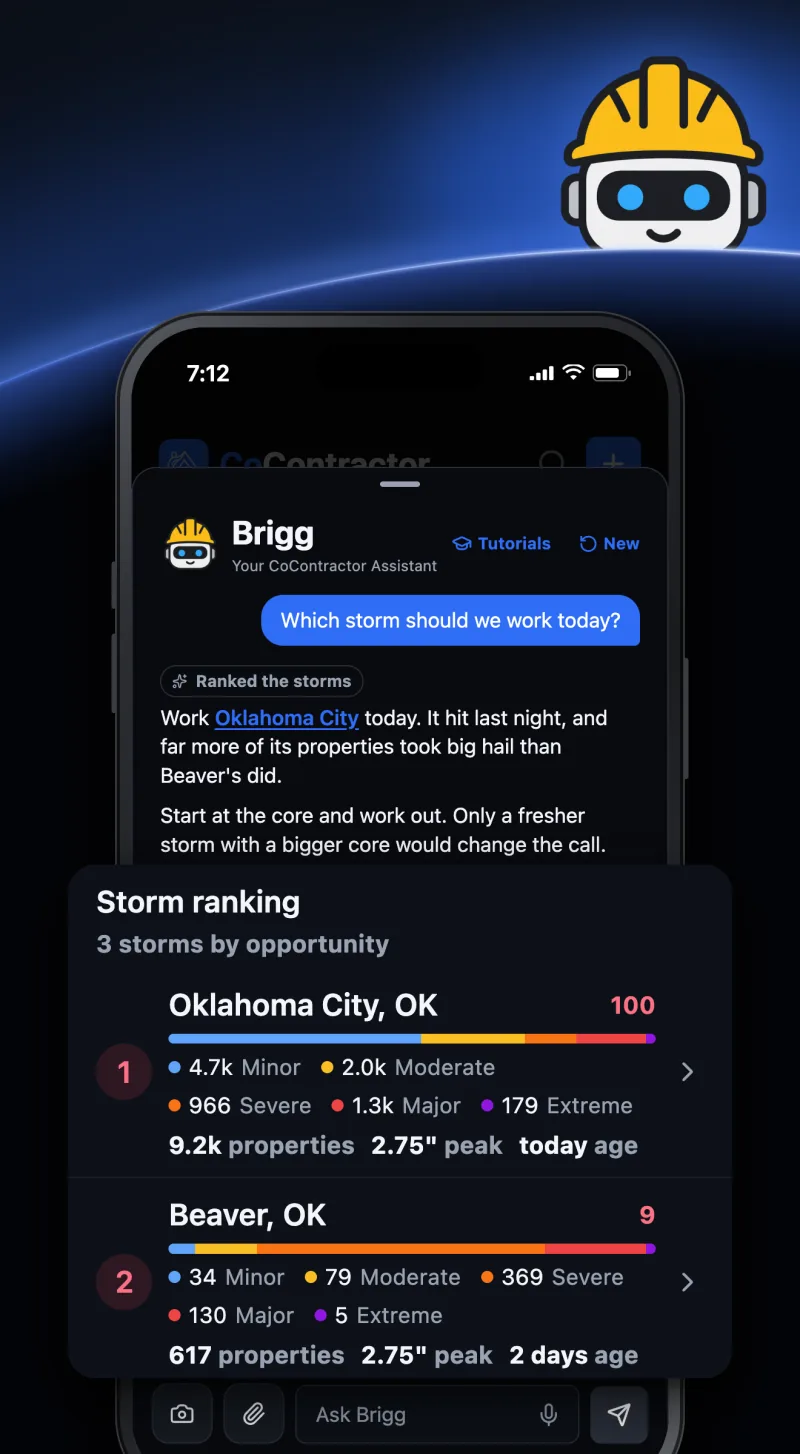
Which storm should we work today?
He ranks the storms by the properties they hit, how big the hail was, and how fresh it is.
Your properties
How many squares is 1418 Oak Ridge?
Measurements, photos, estimates, and the lead's history, on any property you can open.
Your numbers
How'd I do this week?
Doors, inspections, estimates, and signed jobs, for you or your team, against last week.
Your calendar
What's on my calendar tomorrow?
Your appointments and your open times, so booking never clashes.
Your team
Who works the Yukon territory?
Your team, territories, locations, statuses, and tags, the way your company set them up.
The app itself
How do I make a territory?
Step by step, with each button by its name and a link to the screen.
He teaches the app
Learn the app by asking.
Tutorials, at the top of his chat, lists what he can teach, by the stage of a job. Tap one and he walks you through it step by step. For anything on a property or an estimate, he shows you on an example property first, so nothing real changes.
- New reps learn by asking, not by sitting through training
- Every answer names each button and links to the screen
- Owners and admins get Fill in your company, Invite your team, and Make a territory
TutorialsChat- At the door
- Add a property and log a knockYour first door, start to finish
- Book an appointmentAn inspection on the porch
- After the visit
- Read your numbersWhat each number on Reports means
- For owners and admins
- Fill in your companyYour logo, phone, and office
- Invite your teamSend invites and pick roles
- Make a territoryDraw it and assign reps
You stay in control
He does the busywork. You make the calls.
Nothing happens without your tap.Brigg never sends, books, or orders on his own. Every action comes back as a card you check first.
He sees what you can see.Brigg answers from what your own account can open, and nothing more.
Off when you want.Turn Show Brigg off in Settings, Account, and his tab goes away on that phone.
Questions
About Brigg.
Is Brigg included?
Yes. Brigg comes with CoContractor, including the 14-day free trial.
Where do I find him?
In the app, Brigg is the tab on the right edge of every screen. Tap it to open his chat, then type, talk with the mic, or show him a photo.
Can Brigg change my data?
No. He reads what your account can already open. Booking, ordering, and posting come back as cards, and nothing happens until you tap the card's button.
Does he know how the app works?
Yes. Ask how to do anything and he answers step by step, with each button by its name and a link to the screen. Tutorials, at the top of his chat, lists the basics.
What does he know about my company?
What your account can see: your storms and storm settings, your properties and their measurements, photos, and estimates, your appointments, your numbers, and your team, territories, statuses, and tags.
Can I turn him off?
Yes. Turn Show Brigg off in Settings, Account, and his tab and his tutorials go away on that phone.
Put Brigg to work.
Start your trial and ask him which storm to work first.
Built for roofing companies. 14-day free trial. Month to month, cancel anytime. Free hail maps for the US.